
Start Here
About
Speaking
Book
Join The Table
Parent Course
Resources
English
Order my debut book! - 5 Habits of the Tech-Ready Family 📑

Content and feature risks in the app.
Polymarket began as a global crypto-based prediction market and has now come to the U.S. with its own regulated app. Polymarket is a “prediction market” app. Instead of placing a bet, users buy and sell “event contracts” on whether something will happen: who wins Sunday’s game, what the Fed does with interest rates, who wins an election. Like Kalshi, it lets people trade on the outcomes of real-world events.
The U.S. app is described as being operated through a CFTC-regulated derivatives exchange. That status came through Polymarket’s $112 million acquisition of a regulated exchange called QCX.
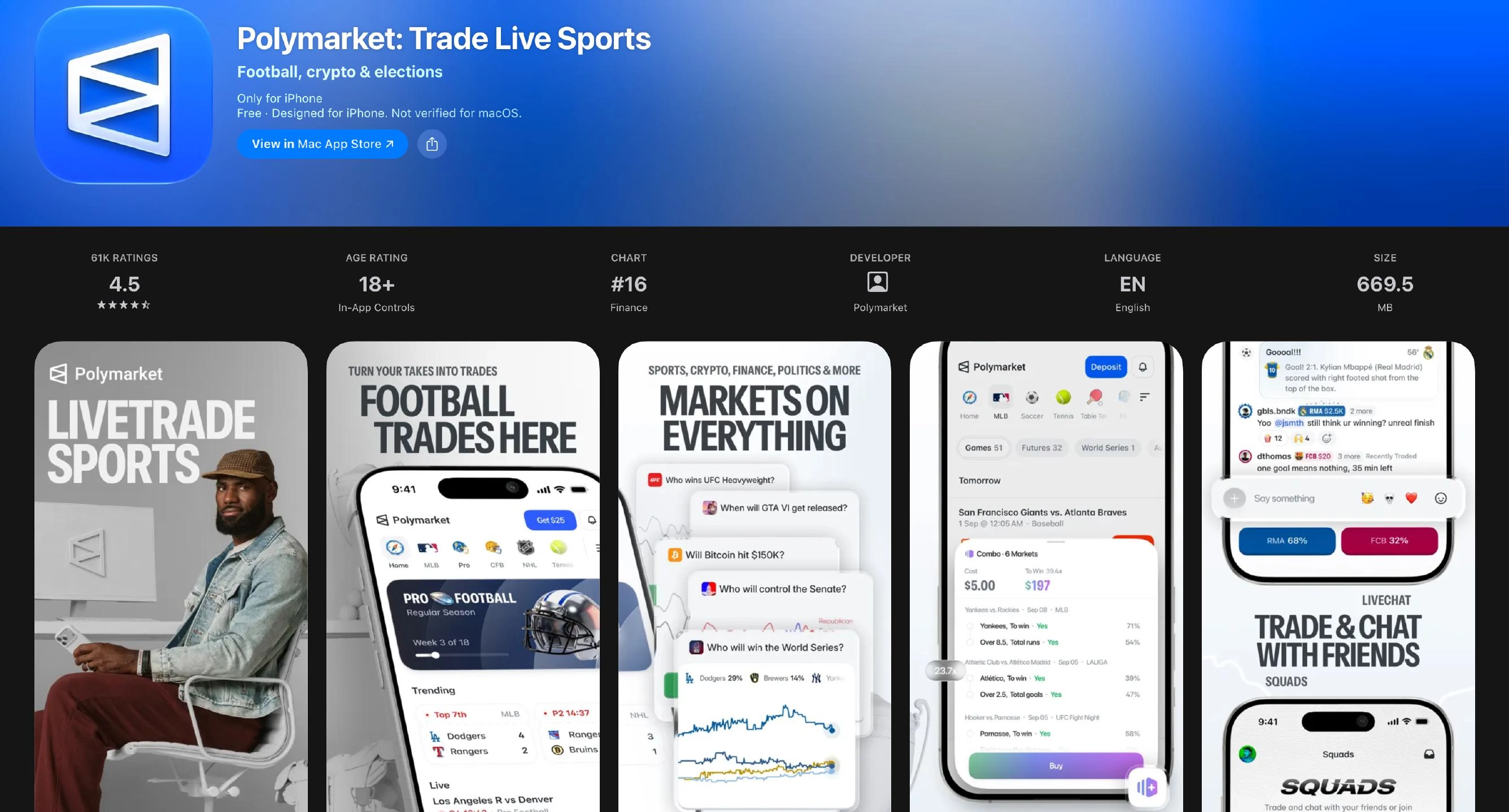
The idea is simple: find something to bet on, pick an outcome, buy “yes” or “no,” and cash out if you’re right. Like with gambling, the payout is often higher based on the expected result. If you choose an unlikely outcome, you’ll get more if it actually happens.
The U.S. app launched with sports trading as well and has since added economics and election markets. Users can browse markets on the website, but trades must happen in the mobile app.
Age, identity, and location. Sportsbooks in most states require you to be 21 or older. But Polymarket allows age 18. However, kids can easily swipe a parent’s ID or the family credit card for a moment. This happens often.
But our children are not the ones at fault. When celebrities, streamers, athletes, and models are in ads for these apps, of course they want to try it out.
Parents, imagine you're back in high school, and your favorite actor, artist, or athlete - the one you look up to, your biggest crush, or maybe even the person you want to be like when you grow up - that person is promoting an exciting way to make money with the device you and all your friends already have. You go to school, and at lunch, it’s all anyone is talking about. Wouldn’t you at least be curious? Peer pressure, especially amongst groups of boys, is very compelling.
In fact, we hear this in the schools where we speak: “all the guys are gambling.”
Polymarket has made this even more desirable with the introduction of “Squads.” This allows users to:
The social elements of Polymarket are worth noting. To teens, this can feel like just another way to connect with the friends and peers.
Polymarket has spent heavily to look mainstream and friendly.
By recruiting the biggest names in the game to sign on, like LeBron James. Polymarket’s “HQ” commercial features athletes and entertainers like Eli Manning, Derek Jeter, Sue Bird, Rajon Rondo, Reggie Bush, Spike Lee, Alexandra Daddario, etc.
A 60-second ad with beloved stars says “this is just fun entertainment” while the product underneath is a way to lose money.
Ethical questions have been raised about active athletes promoting these platforms, since inside information or influence could sway outcomes. And an Army soldier was charged with using confidential government information about a military operation to place bets on Polymarket.
Since Polymarket bets can be placed on nearly anything, there are plenty of unethical bets available.
Critics have asked whether users should be allowed to bet on war and death. As of right now, these are allowed. Teens can end up treating real tragedies as entertainment.
Like how pornography can desensitize people to sexual violence, Polymarket may also be desensitizing people to tragic, real-world events, such as war and genocide.
No one should gamble on the suffering of others.
Because the app is rated 18+ there are no controls. This is not an app for kids. It’s like a digital casino.
We don’t believe it’s healthy for anyone under 18 to be gambling or placing bets on Polymarket. While Polymarket doesn’t have any controls, we can control the app stores on the devices our children use. Here’s how.
For Apple Devices:
To require permission to download an app, you’ll need to set up Screen Time and Family Sharing (Apple’s Parental Controls). We explain this process step-by-step in our Complete iOS Guide (click here).
Once Screen Time and Family Sharing are established, here’s how to require permission to download apps on an Apple device:
What if Polymarket was already downloaded?
Let’s say your child downloaded Polymarket before you set up parental controls or you decided that you didn’t want your child on Polymarket anymore. Unfortunately, it is still possible for your child to get this app again if they have access to the app store even if you enabled Ask To Buy. This app will always be in their library/iCloud and can’t be deleted. The only way to prevent a redownload is to block access to the App Store. You could also turn off Deleting Apps. Then you will be able to see any app your child downloaded when you check their phone.
If you’re not sure if they have downloaded the app, here’s how you can tell. On your child’s device:
Also if you have an app installed on your iPhone, your child will have access through it via Family Sharing. There are some solutions though.
For Android Devices:
You’ll have to use Family Link (Android’s parental controls) to ensure you retain control over what apps are downloaded. We explain this process step-by-step in our Android Guide (click here).
Once Family Link is established, here’s how to require permission to download apps on an Android device:
To see what apps have been recently uninstalled:
No. We don’t believe Polymarket is healthy for kids or teens. The slick marketing, big-name athletes, and desensitizing “it’s just predictions” language make gambling feel harmless. It isn’t.
We don’t recommended anyone under 18 to use this app, and parents of young adults should talk about it before it becomes a habit.
For parents with kids in elementary school, you might want to check in and see if they know about these kinds of apps. They probably don’t, but if they watch sports with the family, then they may have seen the ads.
For parents with kids in middle school and high school, we don’t want you shying away from this topic. Even if your child isn’t on social media, if they watch online content of any kind, they probably know about these apps. So, talk to your kids about it! If you’re not sure where to start, here’s some talking points:
Two actions you can take!


Read about our team’s commitment to provide everyone on our global platform with the technology that can help them move ahead.
Honored to join Bark and other amazing advocates in this film.
Joined a coalition of global experts to present on social media's harms.
We shared our research and experience with the US Senate Judiciary Committee.