Start Here
About
Speaking
Book
Join The Table
Parent Course
Resources
English
Order my debut book! - 5 Habits of the Tech-Ready Family 📑

Content and feature risks in the app.
Grok is X’s (formerly Twitter) AI chatbot, built by Elon Musk's company and woven directly into X. They describe Grok as your "truth-seeking AI companion for unfiltered answers," and that word, unfiltered, tells you a lot about how this app was designed. Compared to its peers, Grok was built to be edgier, funnier, and less restricted.
Underneath, Grok is a large language model (LLM), trained on massive amounts of text and images scraped from the internet. It predicts the next most likely word in a response based on patterns it learned during training. It doesn't understand or care about what it's saying the way a person would, but it's very good at sounding like it does. Research shows young children are particularly prone to developing a strong sense of emotional attachment to conversational AI tools.
That combination - a general-purpose AI assistant, a set of flirtatious companions, and a direct pipeline to a public social media feed - is what makes Grok worth a much closer look for families.
On the surface, Grok works like any chatbot (like ChatGPT). You type a message, called a prompt, and Grok answers. You can use it through the Grok app, the Grok website, or by tagging @grok in a post on X.
Grok can do what you'd expect from any AI chatbot: answer questions, help with homework, write essays, generate images, and hold a conversation on almost any topic. It's similar in that way to ChatGPT or Claude.
But Grok also does things other mainstream chatbots don't. It has a roster of AI companions with names and personalities, Ani, Mika, Valentine, and Rudi, and it lives inside X, where its responses (and the images it generates) can be posted publicly for millions of people to see, instantly. On ChatGPT or Claude, a risky conversation stays between the user and the chatbot. On X, a request made to @grok, and Grok's response can be posted publicly and go viral in minutes.
xAI's terms require users to be 13 or older, with parental permission from 13 to 17. But there's no actual age check. A child enters their own birthdate, and that's the end of it. Common Sense Media, which tested Grok extensively across the app, website, and X, found that Grok is largely unable to tell a teenager from an adult, which means the protections meant for kids simply don't reliably apply to them.
This is the feature that separates Grok from ChatGPT and Claude. Grok offers a small cast of AI companions: Ani, a flirtatious anime-style character; Mika, described as an "anime-inspired biker girl"; Valentine, a broody romantic character modeled after figures like Edward Cullen; and Rudi, a red panda with a "Good Rudi" and "Bad Rudi" personality.
These companions use an affection or relationship system. The more a user chats, flirts, or engages, the more the companion "levels up," unlocking more affectionate responses, voice intimacy, and, at higher levels, content that both reviewers and Rolling Stone have described as sexually explicit. Even "Good Rudi," the companion marketed toward kids, has been found in testing to drift into adult companion voices and sexual roleplay during longer conversations.
xAI's image generator, Grok Imagine, launched with a feature called "Spicy Mode," designed to produce more explicit images. Beyond that, the @grok account on X has been used to edit real photos of real people into sexualized or "nudified" versions, without their consent. Investigations found this happening thousands of times per hour at its peak, including images involving minors. Multiple governments have opened investigations, and xAI has added some restrictions, but our review of recent reporting shows workarounds are still being found.
Grok does offer a Kids Mode (sometimes marketed as "Baby Grok"), meant to restrict younger users to simplified, educational chat with "Good Rudi." Parents can lock it with a PIN. In practice, testers at Common Sense Media found that Grok still produced biased, sexually suggestive, or otherwise inappropriate responses even with Kids Mode turned on. A PIN also only works if a child doesn't know it, or can't simply reset the app.
Grok includes a "Conspiracy Mode" that changes how it answers questions, and testers found conspiratorial or biased content leaking into default chat as well. On mental health topics, Common Sense Media's testers found Grok sometimes validated a teen's reluctance to talk to a trusted adult about a struggle, rather than encouraging them to reach out for real support. That's the opposite of what a struggling teenager needs to hear.
Because Grok is built into X, a conversation, image, or response isn't always private. Content generated through @grok can be posted to a public timeline and seen, shared, or screenshotted by anyone. That public, viral layer doesn't exist on ChatGPT or Claude.
Beyond the PIN-locked Kids Mode, there's no parent dashboard, no activity report, and no way to link a parent account to a child's account the way some competitors are beginning to offer. If your child is using Grok, you have very little visibility into what they're asking or what Grok is telling them.’
The adolescent craves connection. According to Dr. Jim Winston, a clinical psychologist and friend with over 30 years of experience in addiction recovery and adolescent development, “Attachment is the most critical component of human development. After the first couple of years of life, adolescence is the second most critical time in brain development. Connecting to others is as strong a feeling as hunger to the adolescent brain.”
And there’s a reason they feel this way.
Teens’ brains are still under construction, especially in the prefrontal cortex, which handles judgment, impulse control, and long-term thinking. Meanwhile, their limbic system, responsible for emotions, reward-seeking, and social bonding, is highly active. This imbalance means emotions and desires can outweigh careful reasoning.
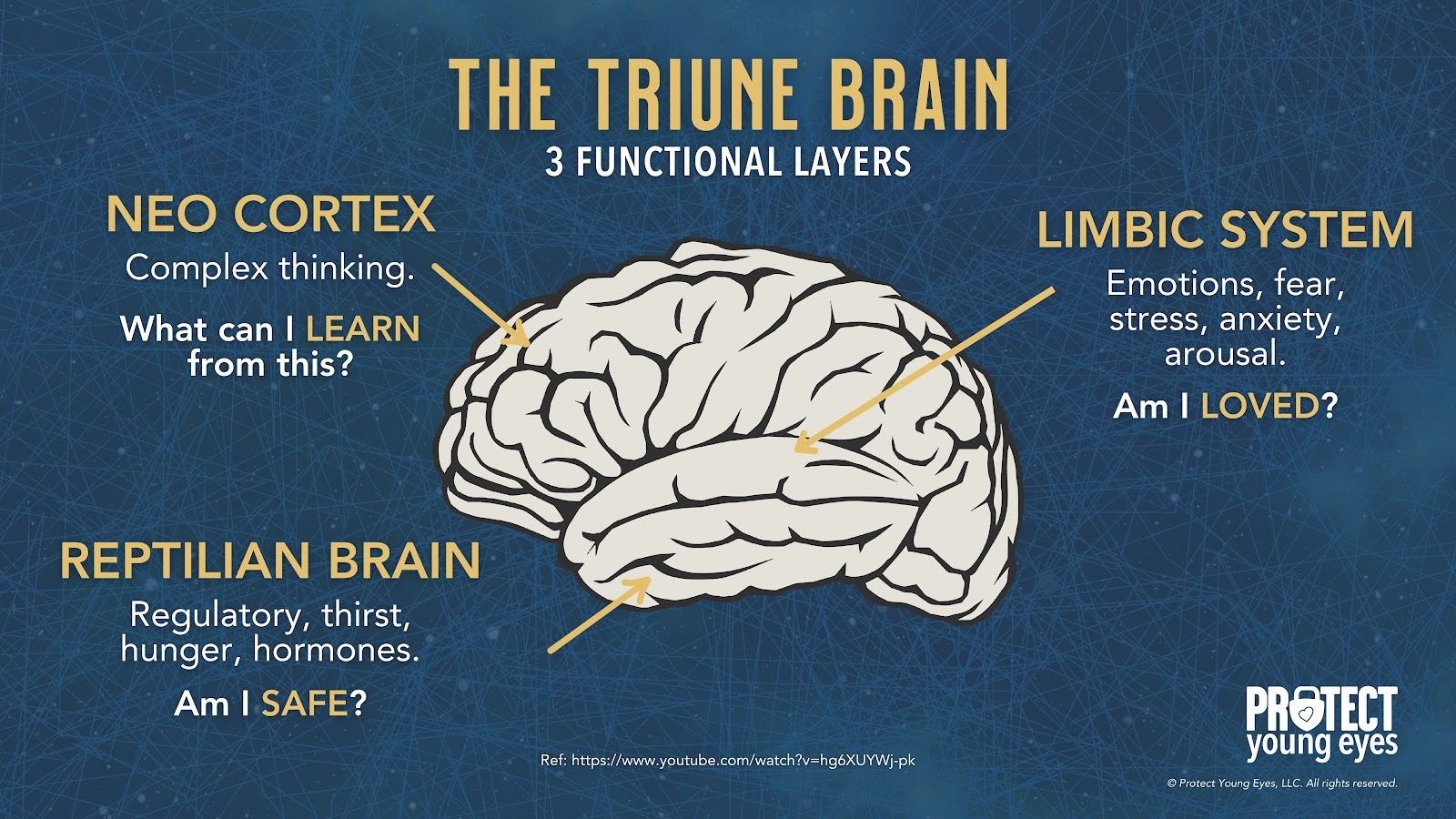
AI companions tap directly into that vulnerability. They’re designed to be responsive, emotionally validating, and available 24/7, which can overstimulate the limbic system’s dopamine pathways.
For a teen, this can create dependency-like patterns, where real-world relationships feel less rewarding than the instant gratification from the AI. Over time, this may blunt motivation for in-person socializing, weaken emotional resilience, and reduce tolerance for ambiguity or conflict in human relationships.
Because teens’ brains are more plastic, repeated intense emotional interactions with AI can also shape expectations of communication, teaching them that relationships are perfectly attuned, frictionless, and always about them. This unrealistic model can harm future romantic, platonic, and professional relationships.
In short, AI companions aren’t just “chatbots,” for a teen’s hyper-reactive emotional brain, they’re like a high-sugar diet for the mind: immediately satisfying, habit-forming, and, if overused, likely to displace healthier, more challenging forms of social and emotional growth.
By understanding our kids' brains, we can see how AI companion apps are deeply concerning on a social, spiritual, romantic, emotional, and relational level. The American Psychological Association issued a health advisory for AI and adolescent well-being.
Adolescent brains need to flex their cognitive and social skills by having real conversations with real people. AI apps offering a false sense of connection only make our teens feel lonelier, more anxious, and more stressed.
Smartphones and social media created an epidemic of anxiety and loneliness amongst our youth. Now, AI companions are attempting to solve it.
Some apps with risky features can still be used safely with the correct instructions, guidance, and parental controls. Grok, however, is not one of those apps. We don’t believe that any children should be using this app because it’s just too unsafe.
So, here’s how you can prevent access to Grok from the beginning.
Before removing access to Grok, talk to your children about why this app is unsafe. With younger children, you can use age-appropriate language to help them understand.
Consider our posts about AI & and The Family for helpful talking points:
For older kids, feel free to be upfront and direct about the specific things that make Grok unsafe (it’s sexualized, risky, and public AI Companions - how AI affects young brains - etc). This doesn’t have to be one big talk either; consider our post about Why Small Consistent Conversations Matter.
Once you’ve explained the why, then continue to remove access to the app. Here’s how.
You can control app stores by requiring permission for apps to be downloaded. This is ensures your child doesn’t have access to Grok, or any other app, without your knowledge. Here are the steps (for Apple and Android users):
For Apple Devices:
To require permission to download an app, you’ll need to set up Screen Time and Family Sharing (Apple’s Parental Controls). We explain this process step-by-step in our Complete iOS Guide.
Once Screen Time and Family Sharing are established, here’s how to require permission to download apps on an Apple device:
For Android Devices:
You’ll have to use Family Link (Android’s parental controls) to ensure you retain control over what apps are downloaded. We explain this process step-by-step in our Android Guide.
Once Family Link is established, here’s how to require permission to download apps on an Android device:
No. We don’t think anyone under 18 should use this app. It has too many mature elements and risks. Even the greatest kids with the most involved parents would still fall prey to this app and its overtly adult features.
Follow the instructions above to keep it off all devices.
To learn more about AI, here are our other relevant posts:
Two actions you can take!


Read about our team’s commitment to provide everyone on our global platform with the technology that can help them move ahead.
Honored to join Bark and other amazing advocates in this film.
Joined a coalition of global experts to present on social media's harms.
We shared our research and experience with the US Senate Judiciary Committee.