Start Here
About
Speaking
Book
Join The Table
Parent Course
Resources
English
Order my debut book! - 5 Habits of the Tech-Ready Family 📑

Content and feature risks in the app.
Claude is an AI assistant created by Anthropic, a San Francisco-based AI safety company. Think of it as an extremely capable, text-based conversation partner — one that can write essays, explain complex topics, help with homework, generate creative stories, write code, and engage in open-ended dialogue on nearly any subject a user brings to it.
Unlike social media apps or games, Claude isn’t built around likes, followers, or entertainment. It’s a tool, and a genuinely powerful one. That’s exactly what makes it worth examining closely. The better a tool is, the more important it is to understand how a child might use it and how it could harm them.
Claude is accessible through the Claude.ai website and mobile app, and is also embedded into many third-party apps and websites that your child may already be using, often without any obvious labeling.
Claude is often seen as a relatively family-friendly AI chatbot because it uses a “Constitutional AI” approach that emphasizes safety and ethical guidelines. It is built to avoid generating harmful, violent, or explicit content. However, it isn’t specifically made for children, so there are still potential risks, especially for younger users, making parental supervision important.
Claude works through a simple chat interface. A user types a message, called a “prompt,” and Claude responds. Back and forth. That’s it, on the surface. Similar to ChatGPT.
But here’s what’s happening underneath: Claude is a large language model (LLM). It was trained on enormous amounts of text from the internet, books, and other sources, and it generates responses by predicting the most relevant, coherent reply. It does not “think” like a human. It doesn’t have feelings, goals, or relationships. But it is extraordinarily good at sounding like it does all of those things.
What a child can do with Claude:
Claude does have built-in safety guidelines designed to refuse harmful requests, but it is not foolproof. A determined user, especially a teen, can often find ways to push past guardrails through creative prompting.
Claude.ai requires users to be 13 or older. But like most apps, there is no meaningful verification. A younger child can create an account with a fake birthdate in under two minutes.
Claude has safety filters, and in our experience, it generally handles overtly harmful requests appropriately. However, conversations can drift into mature emotional, relational, or philosophical territory, especially in longer exchanges. A child asking about depression, self-harm, relationships, or identity may receive responses that, while not malicious, are nuanced in ways better suited for a trusted adult conversation.
Claude can also generate creative fiction. A child can ask it to write a story involving violence, moral ambiguity, or romantic scenarios. The output depends heavily on how the request is framed.
This is the elephant in the room for every parent with a school-age child.
Claude can write a complete, polished essay on any topic in seconds. For families trying to build integrity and a work ethic in their kids, unmonitored access to Claude is a genuine challenge. Unlike a search engine that finds information, Claude does the work, and it does it well.
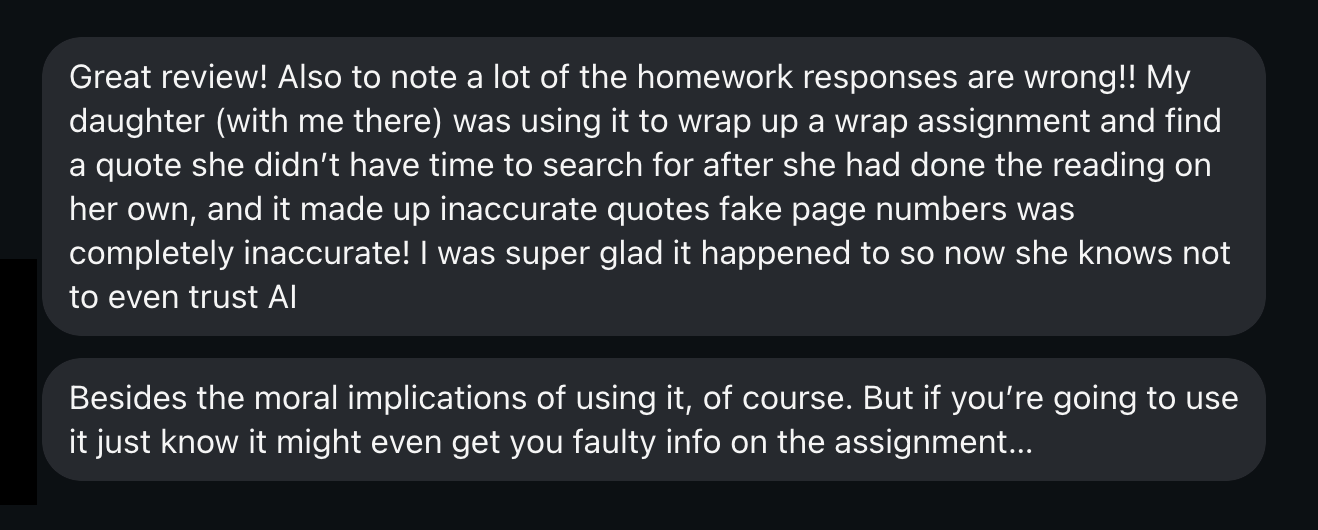
However, it's not always perfect or even correct! Here's a message we received from a parent who saw this review, and had some personal experience with her daughter using Claude for homework help:
Claude is designed to be helpful, thoughtful, and engaged. For a lonely or struggling teenager, that can feel deeply meaningful. Unlike social media apps that come with social risk, rejection, and comparison, Claude is infinitely patient and never judges. That can be comforting, or it can become a substitute for a real human connection.
Watch for signs that your child is turning to Claude for emotional support that they should be getting from real people. See our Complete Guide to AI Companions to learn why emtional connection with AI is dangerous.
Conversations may be used for AI training. For consumer accounts (Free, Pro, and Max), data training is turned on by default. Users who opt in allow Anthropic to retain conversation data for up to five years. Those who opt out are subject to a 30-day retention period. Deleted conversations will not be used for training, and Anthropic has stated that data will not be sold to third parties. 
What this means for your child: Anything a child types into Claude, personal struggles, questions about their identity, details about their family, or school problems, could be stored and reviewed. Even with the best privacy protections, parents should understand that this is not a private journal. It is a conversation with a tech company’s platform.
Anthropic employees can access conversations under certain circumstances. By default, employee access is restricted unless you explicitly consent to share your data or a review is needed to enforce Anthropic’s Usage Policy, in which case only designated Trust & Safety team members may access conversations.  Still, parents should know the door is not completely closed.
In general, when it comes to AI, we don’t want to share much with it. To learn more about what to share or not share, watch our video, Don’t Give the Bot, Your Lot.
Unlike a messaging app like Signal or Facebook Messenger, Claude conversations are not encrypted at rest. They are encrypted during transmission, but stored on Anthropic’s servers.
Claude is built into thousands of third-party products and websites via an API. If your child encounters “Claude” inside another app, that app’s own privacy policy, not Anthropic’s, governs the data. Privacy protections vary widely.
Claude.ai offers no family account features, no content dashboards for parents, no monitoring tools, and no way to link a parent account to a child’s account. If your child is using Claude, you will not be notified about what they’re asking or what Claude is telling them.
The adolescent craves connection. According to Dr. Jim Winston, a clinical psychologist and friend with over 30 years of experience in addiction recovery and adolescent development, “Attachment is the most critical component of human development. After the first couple of years of life, adolescence is the second most critical time in brain development. Connecting to others is as strong a feeling as hunger to the adolescent brain.”
And there’s a reason they feel this way.
Teens’ brains are still under construction, especially in the prefrontal cortex, which handles judgment, impulse control, and long-term thinking. Meanwhile, their limbic system, responsible for emotions, reward-seeking, and social bonding, is highly active. This imbalance means emotions and desires can outweigh careful reasoning.
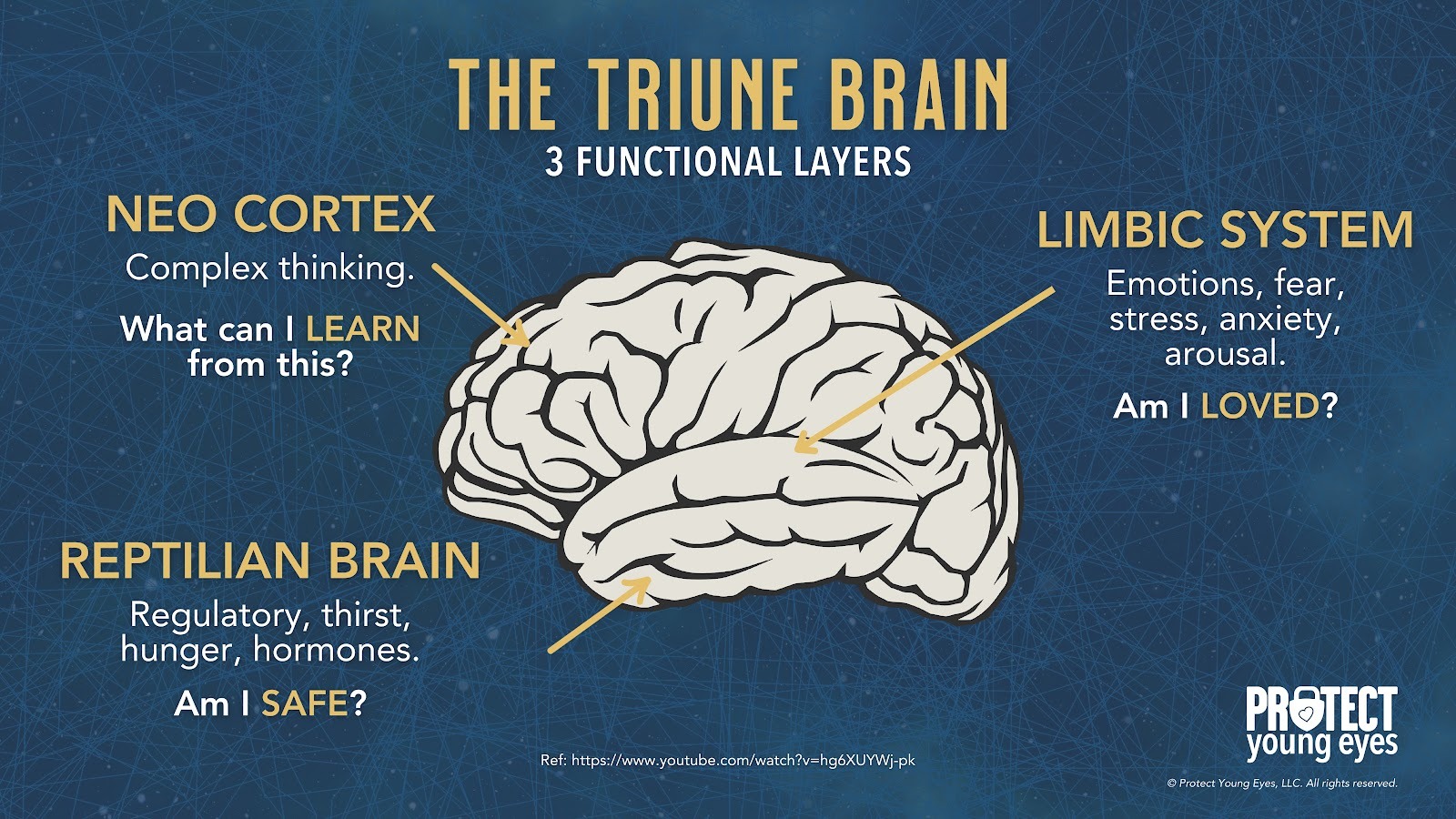
AI companions tap directly into that vulnerability. They’re designed to be responsive, emotionally validating, and available 24/7, which can overstimulate the limbic system’s dopamine pathways. ChatGPT can be used to function like an AI companion.
For a teen, this can create dependency-like patterns, where real-world relationships feel less rewarding than the instant gratification from the AI. Over time, this may blunt motivation for in-person socializing, weaken emotional resilience, and reduce tolerance for ambiguity or conflict in human relationships.
Because teens’ brains are more plastic, repeated intense emotional interactions with AI can also shape expectations of communication, teaching them that relationships are perfectly attuned, frictionless, and always about them. This unrealistic model can harm future romantic, platonic, and professional relationships.
In short, AI companions aren’t just “chatbots,” for a teen’s hyper-reactive emotional brain, they’re like a high-sugar diet for the mind: immediately satisfying, habit-forming, and, if overused, likely to displace healthier, more challenging forms of social and emotional growth.
By understanding our kids' brains, we can see how AI companion apps are deeply concerning on a social, spiritual, romantic, emotional, and relational level. The American Psychological Association issued a health advisory for AI and adolescent well-being.
Adolescent brains need to flex their cognitive and social skills by having real conversations with real people. AI apps offering a false sense of connection only make our teens feel lonelier, more anxious, and more stressed.
Smartphones and social media created an epidemic of anxiety and loneliness amongst our youth. Now, AI companions are attempting to solve it.
Regardless of the app, three actions mitigate the risks we’ve shared. We teach these actions in our parent presentations:
We explain each of them briefly below. If you’ve already set up approvals for downloads and have used the app, please skip to the In-App Controls & Settings.
You can control app stores by requiring permission for apps to be downloaded. This is ensures your child doesn’t have access to an app without your knowledge. Here are the steps (for Apple and Android users):
For Apple Devices:
To require permission to download an app, you’ll need to set up Screen Time and Family Sharing (Apple’s Parental Controls). We explain this process step-by-step in our Complete iOS Guide (click here).
Once Screen Time and Family Sharing are established, here’s how to require permission to download apps on an Apple device:
For Android Devices:
You’ll have to use Family Link (Android’s parental controls) to ensure you retain control over what apps are downloaded. We explain this process step-by-step in our Android Guide (click here).
Once Family Link is established, here’s how to require permission to download apps on an Android device:
This is our tried-and-true method of determining whether a specific app is safe for your specific child.
Before you let your child use it, download the app and use it for 7 days.
Create an account with your child’s age and gender, and use it for 7 days. Play through a few levels, review the ads, see if anyone can chat with you, and poke around like a curious child.
After a week, ask yourself, “Do I want my child to experience what I did?” Even if you decide to allow them to download the app, now you have a basis for curious conversations about the app when you check in.
Unfortunately, there are no in-app solutions here. The safeguards are on the parents and the device operating Claude. Here are some more practical tips:
1. Have a direct conversation about academic integrity.
Don’t assume your child knows where the line is. Talk explicitly about the difference between using AI as a learning tool versus using it to complete work that’s supposed to be theirs. Schools are increasingly detecting AI-written work the consequences are real. Consider calling your school to find out what their AI policy is. Some schools allow it to a certain extent, while others don’t allow AI at all. Whether you agree with their stance or not, knowing their AI policy (if they have one) is helpful.
2. Talk about AI and emotional boundaries.
Friends, AI is the New Porn Talk, so if you haven’t talked about AI with your kids, then you probably need to (how to talk to your kids about AI). Especially if your child is using Claude for any AI for emotional support, have an honest conversation about why human relationships, while harder, matter more. Claude is not a therapist, a friend, or a mentor. It’s software. And having emotional conversations with any AI can lead to serious harm.
3. Manage privacy settings immediately.
If you allow your child to use Claude, go to their settings and opt out of data sharing for model training. Navigate to claude.ai → Settings → Data & Privacy Controls and disable the model training toggle. This helps keep your child’s data private.
For elementary-age children: No.
The content risk, the lack of age verification, and the absence of any parental oversight tools make this inappropriate for young kids.
For middle schoolers: Proceed with serious caution.
The homework risk alone is significant. Add in the potential for emotionally engaging conversations without parental visibility, and you have an app that requires deep trust and ongoing conversation, not passive permission. So, it can be okay, but stay involved when your kid is using Claude. Be curious, ask them what happens when they use Claude, listen to them, and see if anything needs to change.
For high schoolers: Conditional yes, with guardrails.
Claude can be a genuinely useful academic and creative tool for a teenager who has been coached on how to use it responsibly. The risks don’t disappear, but a mature, integrity-formed teen can learn to use AI tools in healthy ways. But that doesn’t happen automatically; it requires an intentional parent and a specific kid. You know your kid best; Claude may or may not be the best fit just yet.
Two actions you can take!



Read about our team’s commitment to provide everyone on our global platform with the technology that can help them move ahead.
Honored to join Bark and other amazing advocates in this film.
Joined a coalition of global experts to present on social media's harms.
We shared our research and experience with the US Senate Judiciary Committee.